NSFAS Application 2027: Requirements, Documents and How to Apply
The NSFAS application 2027 cycle is open for students planning to study at a public university or TVET college in South Africa. Applications opened on 18 September 2026 and the current NSFAS website lists 31 October 2026 at 23:59 South African time as the closing date. Applying for NSFAS funding is free and can be done online through myNSFAS.
Students can create a myNSFAS profile, complete their personal and household details, submit the required consent information, upload supporting documents and track their application online.
NSFAS Application 2027 Closing Date
The current NSFAS application dates are:
| NSFAS 2027 application detail | Date |
|---|---|
| Applications open | 18 September 2026 |
| Applications close | 31 October 2026 |
| Closing time | 23:59 South African time |
| Application fee | Free |
| Application platform | myNSFAS |
| Missing-document submission period | 30 working days, based on a request |
NSFAS advises applicants to submit early rather than waiting until the final day. The current NSFAS material states that late applications cannot be accepted after the application window closes.
Who Can Apply for NSFAS 2027?
NSFAS funding is available to qualifying South African citizens and permanent residents planning to study, or already studying, at a public university or TVET college.
Financial and academic requirements apply.
The current NSFAS FAQ lists these financial thresholds for bursary applicants:
| Applicant category | Annual household income |
|---|---|
| Non-SASSA bursary applicant | R350,000 or less |
| Person with a disability | R600,000 or less |
| Verified SASSA grant recipient | Automatically meets the financial requirement for a bursary |
| Undergraduate NSFAS loan applicant | More than R350,000 and up to R600,000 |
| Postgraduate NSFAS loan applicant | R600,000 or less |
Meeting an income threshold alone does not guarantee funding. Academic, registration, qualification and other NSFAS requirements also apply.
NSFAS Requirements 2027
The requirements can differ according to your personal situation, study type and funding category.
General requirements may cover:
- South African citizenship or permanent residency
- Study at an approved public university or TVET college
- Financial eligibility
- Academic eligibility
- Correct personal information
- Household income information
- Signed consent documentation
- Supporting documents requested through myNSFAS
- Registration at an eligible institution for the funding process
NSFAS checks information against third-party sources such as SARS, Home Affairs and SASSA as part of its verification process.
NSFAS Income Requirements 2027
For a standard NSFAS bursary application, the current published household-income threshold for a non-SASSA applicant is R350,000 or less per year.
For students with disabilities, the published threshold is R600,000 or less per year.
NSFAS uses gross household income for the relevant applicant category.
Gross income means income before deductions such as tax.
For an unmarried applicant, income can be assessed together with the income of the relevant parent or parents. A legal guardian can apply under the relevant guardian circumstances. A married applicant’s income can be assessed together with the spouse’s income.
Applicants with special household circumstances should follow the information requested by myNSFAS rather than submitting unrelated documents.
NSFAS SASSA Requirements 2027
Verified SASSA grant recipients receive special treatment under the financial eligibility process.
The current NSFAS FAQ states that verified SASSA grant recipients automatically meet the financial requirement for a bursary and do not need to meet the R350,000 household-income limit.
SASSA information can be verified through the relevant government data.
A SASSA recipient should still complete the application properly and submit any documents requested through myNSFAS.
NSFAS Application 2027 for Students With Disabilities
Students with disabilities have a higher household-income threshold for NSFAS bursary eligibility.
The current NSFAS disability support information states that an applicant with a disability can qualify financially with household income of R600,000 or less per year, subject to the applicable academic requirements.
Students may also need the NSFAS Disability Annexure or other disability-related documentation.
The current NSFAS site provides specific application guidance and accessibility support for students with disabilities.
NSFAS Application 2027 for University Students
University students can apply for NSFAS funding through myNSFAS.
The basic process is:
- Create a myNSFAS profile.
- Complete the application.
- Provide household information.
- Sign the required consent form.
- Upload requested documents.
- Review your information.
- Submit the application.
- Save your reference number.
- Track the application through myNSFAS.
Admission to a university and NSFAS funding are separate processes. A student should follow the university admission process alongside the NSFAS application.
NSFAS Application 2027 for TVET Students
Students planning to study at a public TVET college can also apply for NSFAS funding under the applicable requirements.
A TVET applicant should:
- Apply to the relevant TVET college.
- Create or access a myNSFAS account.
- Complete the NSFAS application.
- Provide the requested household information.
- Upload requested documents.
- Submit the application.
- Keep the application reference number.
- Monitor myNSFAS for updates.
Registration information from the college can later be relevant to funding confirmation.
NSFAS Documents Required 2027
NSFAS uses the information in your application to generate a personalised document list.
The current NSFAS supporting-document information states that the applicant’s exact document requirements appear through myNSFAS. Applicants should upload the documents requested for their own application rather than adding unrelated paperwork.
NSFAS Consent Form 2027
The consent form is required from applicants under the published NSFAS process.
It gives NSFAS permission to verify identity, household and income information against relevant third-party sources.
The current NSFAS material states that the consent form needs signatures from the applicant and relevant parent, legal guardian or spouse whose details appear on the application.
NSFAS Declaration Form 2027
Some applicants may need an NSFAS Declaration Form based on their personal and household circumstances.
The portal can request this form based on the information provided during the application.
Do not submit a declaration form simply because another applicant needed one.
NSFAS Disability Annexure
Students with disabilities may need the NSFAS Disability Annexure.
The form relates to disability support and helps NSFAS assess the applicant’s circumstances under the relevant funding process.
Orphan or Vulnerable Child Form
An applicant who falls under the orphan or vulnerable-child category may need the relevant declaration form.
The current NSFAS material lists a 2027 Orphan or Vulnerable Child Declaration Form among the supporting forms.
Parent or Guardian Documents
A parent or guardian’s ID documentation can be requested based on the details provided in the application.
The portal determines the documents required for the individual applicant.
Income Documents
Non-SASSA applicants may need information or documentation relating to household income.
The exact requirement depends on the household situation and the information available to NSFAS through verification.
NSFAS Supporting Documents: How to Upload Them
After creating a myNSFAS profile:
- Sign in.
- Select the application option.
- Complete your personal details.
- Complete household-income information.
- Review the requested documents.
- Prepare readable copies.
- Upload each requested document.
- Review the uploaded files.
- Submit the application.
- Save your reference number.
NSFAS currently advises applicants to make sure document pages are fully visible and readable. Its current application material also states that PDF or JPEG files can be uploaded, with a stated maximum of 20 MB per file.
Why NSFAS Documents Get Rejected
A document can cause a problem if the uploaded copy cannot be read or does not meet the relevant form requirements.
Common problems can include:
- Blurry image
- Cropped document
- Missing page
- Missing signature
- Wrong form
- Old form
- Poor scan
- Details that do not match
- Text that cannot be read
- Incorrect signature format
The current NSFAS supporting-document information says applications are assessed after the required documents have been received and are readable.
How to Prevent Document Problems
Use a clear scan or photograph.
Show the entire document.
Check every page before uploading.
Use the current 2027 form.
Sign the form according to its instructions.
Check names, ID numbers and other personal details.
Keep a copy of submitted documents for your records.
NSFAS Application 2027 Online: Step-by-Step Process
Step 1: Create a myNSFAS Account
Visit the official myNSFAS platform or use the official NSFAS mobile app.
You need your South African ID number, cellphone number and email address for profile creation.
Step 2: Activate Your Profile
An OTP can be sent to your registered cellphone number for account activation.
Never give the OTP to another person.
Step 3: Sign In
Use your myNSFAS login details.
Existing users should access their existing profile rather than creating duplicate accounts.
Step 4: Select Apply
Open the application section and complete the required fields.
NSFAS asks for personal and household information as part of the application process.
Step 5: Complete Household Information
Provide accurate information about the people whose income forms part of your household assessment.
Check spelling, ID numbers and income details carefully.
Step 6: Sign the Consent Form
Provide the required consent information and signatures.
This allows NSFAS to verify information through relevant data sources.
Step 7: Upload Documents
Upload every document requested by your myNSFAS profile.
Make sure each file is readable and complete.
Step 8: Review Your Application
Check:
- Full name
- ID number
- Contact details
- Household information
- Institution details
- Income information
- Uploaded documents
Step 9: Submit
Submit the completed application through myNSFAS.
Step 10: Save Your Reference Number
Keep your NSFAS application reference number.
It can help with later status checks and support enquiries.
NSFAS Application 2027 on a Phone
You can apply for NSFAS using a mobile phone.
The current NSFAS website states that applicants can create a myNSFAS profile, upload documents and track their application from a phone. It also provides access through the official NSFAS mobile app.
A computer is therefore not required for the basic online application process.
Before uploading documents from a phone:
- Use a clear camera image.
- Place the document on a flat surface.
- Use good lighting.
- Check every corner of the document.
- Make sure the text can be read.
- Check the file before submission.
NSFAS App 2027
NSFAS provides an official mobile application route.
Use app links published through the official NSFAS website rather than downloading an app from an unknown source.
The NSFAS website warns applicants about unofficial applications claiming to provide NSFAS services.
Common NSFAS Application Mistakes
1. Creating a duplicate account
Existing applicants should use their existing myNSFAS profile.
2. Entering incorrect personal details
Check your ID number, name and contact information.
3. Uploading unreadable documents
A blurry image can cause a document request.
4. Using an old form
Use the current 2027 form requested by NSFAS.
5. Missing a signature
Check every signature field before uploading a form.
6. Ignoring myNSFAS notifications
A document request can require action within a set period.
7. Waiting until the final day
Technical problems, poor internet access or document issues can delay submission.
8. Forgetting the reference number
Save the reference number after submitting your application.
9. Paying someone to apply
NSFAS states that applications are free.
10. Sharing an OTP
Never give your OTP to another person.
Can I Change My NSFAS Application After Submission?
Review your information carefully before pressing Submit.
The official application process tells applicants to check their details and documents before submission.
For a correction after submission, sign in to myNSFAS and check the options available for your application.
Do not create another account just to submit another application.
For account-specific corrections, use official NSFAS support.
What Happens After NSFAS Application 2027 Submission?
After submission, NSFAS processes the application through different stages.
A simplified process looks like this:
Application submitted
↓
Verification
↓
Document review
↓
Eligibility assessment
↓
Funding decision
↓
Registration confirmation
↓
Funding and allowance processing
The current NSFAS application system displays stages such as Verification in progress, Awaiting documents, Funding eligible and Unsuccessful.
NSFAS Application Status 2027
After submitting your application, use myNSFAS to follow its progress.
Verification in Progress
NSFAS is checking your details against relevant information sources.
The current NSFAS system says verification can involve Home Affairs, SARS and SASSA.
Awaiting Documents
A requested document is missing or unreadable.
Sign in to myNSFAS and upload the requested document.
Funding Eligible
You meet the relevant funding criteria at that stage.
The current NSFAS application system states that funding is confirmed once the applicant registers at a public university or TVET college.
Unsuccessful
Your application did not meet the applicable criteria.
The reason should appear in myNSFAS, and eligible applicants can use the appeal process.
For a full explanation of NSFAS statuses, applicants can also check your NSFAS statusu.
NSFAS Missing Documents 2027
NSFAS gives applicants a period to respond to missing-document requests.
The current supporting-document information lists 30 working days for submission of requested missing documents.
Sign in to myNSFAS and check the exact document requested.
Upload it through your account rather than sending documents to random email addresses or social media accounts.
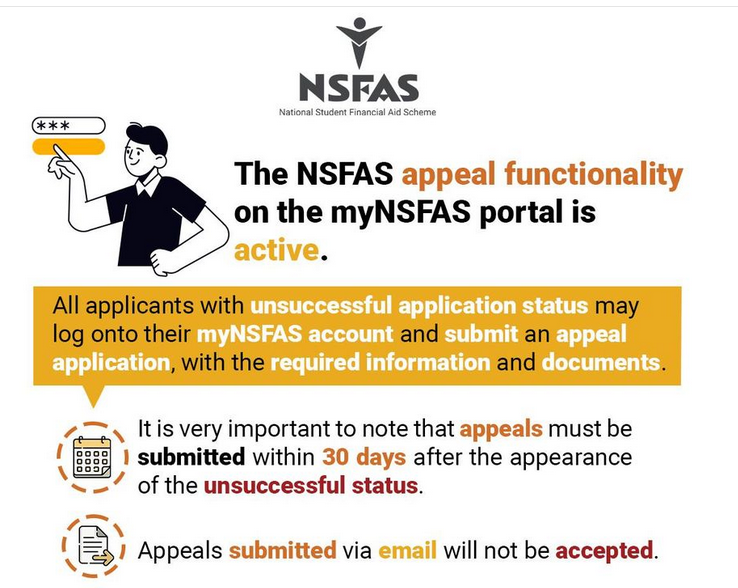
NSFAS Application Appeal 2027
An unsuccessful application can have an appeal route for eligible applicants.
The current NSFAS information states that rejected applicants who qualify to appeal may submit an appeal within 30 days of receiving their application results.
A student should:
- Sign in to myNSFAS.
- Read the unsuccessful reason.
- Check appeal eligibility.
- Prepare documents supporting the appeal reason.
- Submit the appeal through the official system.
- Save proof of submission.
- Monitor the account for updates.
An appeal does not guarantee a funding decision in the student’s favour.
NSFAS Funding: What Does It Pay For?
NSFAS funding can cover approved study-related costs under the applicable funding policy.
The current NSFAS application information lists areas such as:
- Tuition fees
- Registration fees
- Accommodation
- Transport allowance
- Learning materials
- Personal care allowance
The amount and type of support can depend on the approved funding policy and the student’s circumstances.
NSFAS Allowances After Approval
Funding approval and allowance payment are separate stages.
The current NSFAS website states that allowances start after the institution confirms registration and funding is confirmed. Payment dates are set with the institution.
A student with a funding decision should therefore check registration records and myNSFAS information.
Is NSFAS Application 2027 Free?
Yes.
NSFAS states that applying is free.
You do not need to pay a person to submit your application.
Anyone asking for money in exchange for an NSFAS funding decision should be treated as a scam risk.
NSFAS Application 2027 Scams to Avoid
Protect your personal information during the application process.
Never share:
- NSFAS password
- OTP
- Banking PIN
- Online banking password
- Card PIN
NSFAS states that it will not ask applicants for their password or OTP through SMS, WhatsApp or phone. The official site also advises applicants to use nsfas.org.za and my.nsfas.org.za for NSFAS services.
Do not pay a person who claims they can secure funding.
Do not upload personal documents to an unknown website.
NSFAS Application Contact Details
For support, use the official NSFAS contact channels.
Toll-free: 08000 67327
Email: [email protected]
The current NSFAS site also provides WhatsApp, USSD and other support routes through its official contact and support system.
Students can also contact their university financial-aid office or TVET college support office for institution-related registration matters.
NSFAS Application 2027 Checklist
Before submitting your application, check each item below:
- South African ID information
- Active cellphone number
- Active email address
- myNSFAS profile
- Household information
- Income information
- Consent form
- Required supporting documents
- Disability documentation, where applicable
- Orphan or vulnerable-child documentation, where applicable
- Declaration form, where requested
- Correct 2027 forms
- Readable document scans
- Application details reviewed
- Application submitted
- Reference number saved
FAQs
Is NSFAS application 2027 open?
Yes. The current NSFAS website lists 18 September 2026 as the opening date for the 2027 application cycle.
What is the NSFAS application 2027 closing date?
The current NSFAS website lists 31 October 2026 at 23:59 South African time as the closing date.
How do I apply for NSFAS 2027?
Create a myNSFAS profile, sign in, select Apply, complete your personal and household information, provide consent, upload requested documents, review your information and submit the application.
How much does NSFAS application 2027 cost?
There is no application fee. NSFAS states that applying is free.
Can I apply for NSFAS using my phone?
Yes. NSFAS states that applicants can apply online using a phone and can also use the official NSFAS mobile app.
What documents do I need for NSFAS 2027?
The exact list depends on your application type and personal circumstances. myNSFAS generates the document list for your application. A signed consent form is part of the published application process, with other forms requested based on your circumstances.
Do SASSA recipients qualify for NSFAS?
Verified SASSA grant recipients automatically meet the financial requirement for a bursary under the current NSFAS FAQ. Other NSFAS eligibility requirements still apply.
What is the NSFAS income limit for 2027?
The current published bursary threshold for non-SASSA applicants is R350,000 or less in gross combined household income per year. The threshold for applicants with disabilities is R600,000 or less.
Can students with disabilities apply for NSFAS 2027?
Yes. NSFAS has a disability support programme. The current published household-income threshold for applicants with disabilities is R600,000 or less per year, subject to applicable academic requirements.
Can TVET students apply for NSFAS 2027?
Yes. NSFAS funding applies to qualifying students at public TVET colleges as well as public universities.
How do I check my NSFAS application status?
Sign in to myNSFAS and open your application tracker. The system can show stages such as verification in progress, awaiting documents, funding eligible or unsuccessful.
What does “Awaiting Documents” mean on NSFAS?
It means NSFAS has requested a document that is missing or unreadable. Sign in to myNSFAS and upload the requested document.
How many days do I have to submit missing NSFAS documents?
The current NSFAS supporting-document information lists 30 working days for requested missing documents.
Can I appeal an unsuccessful NSFAS application?
Eligible rejected applicants can submit an appeal. Current NSFAS information states that eligible applicants have 30 days from receiving their application results to appeal.
Does meeting the NSFAS income limit guarantee funding?
No. Income eligibility forms one part of the funding assessment. Academic, registration and other applicable requirements also apply.
Can I apply for NSFAS and university admission separately?
Yes. University admission and NSFAS funding applications are separate processes. A student should follow the admission process for the chosen institution alongside the NSFAS application.
Can I apply for NSFAS at a private college?
NSFAS funding is intended for qualifying study at approved public universities and TVET colleges under the applicable funding rules.
What happens after I submit my NSFAS application?
Your application moves through processing and verification stages. NSFAS may request additional documents, assess eligibility and later process registration and funding information. Track progress through myNSFAS.
Can I create another NSFAS account after submitting an application?
Use your existing myNSFAS account rather than creating a duplicate account. For account problems, use official NSFAS support.
Do I need to pay someone to apply for NSFAS?
No. NSFAS applications are free. A person asking for payment to secure funding should be treated as a scam risk.
Final Steps for NSFAS Application 2027
The NSFAS application 2027 process starts with a myNSFAS profile and ends with a submitted application that can be tracked online.
Before submission:
- Check your eligibility.
- Prepare your household-income information.
- Complete the consent requirements.
- Check the personalised document list.
- Upload readable documents.
- Review every application field.
- Submit before 31 October 2026 at 23:59 South African time.
- Save your reference number.
- Check myNSFAS for future notifications.
Use the official NSFAS platform for your application and account information. The current NSFAS website confirms that applications are free and that applicants can apply online from a phone, upload documents and track their application through myNSFAS.

- NSFAS Payment Dates 2027: Key Dates for Receiving Your Funds - October 19, 2026
- NSFAS Stages 2027 and Their Meanings - October 18, 2026
- NSFAS Consent Form 2027 PDF Download - October 8, 2026